

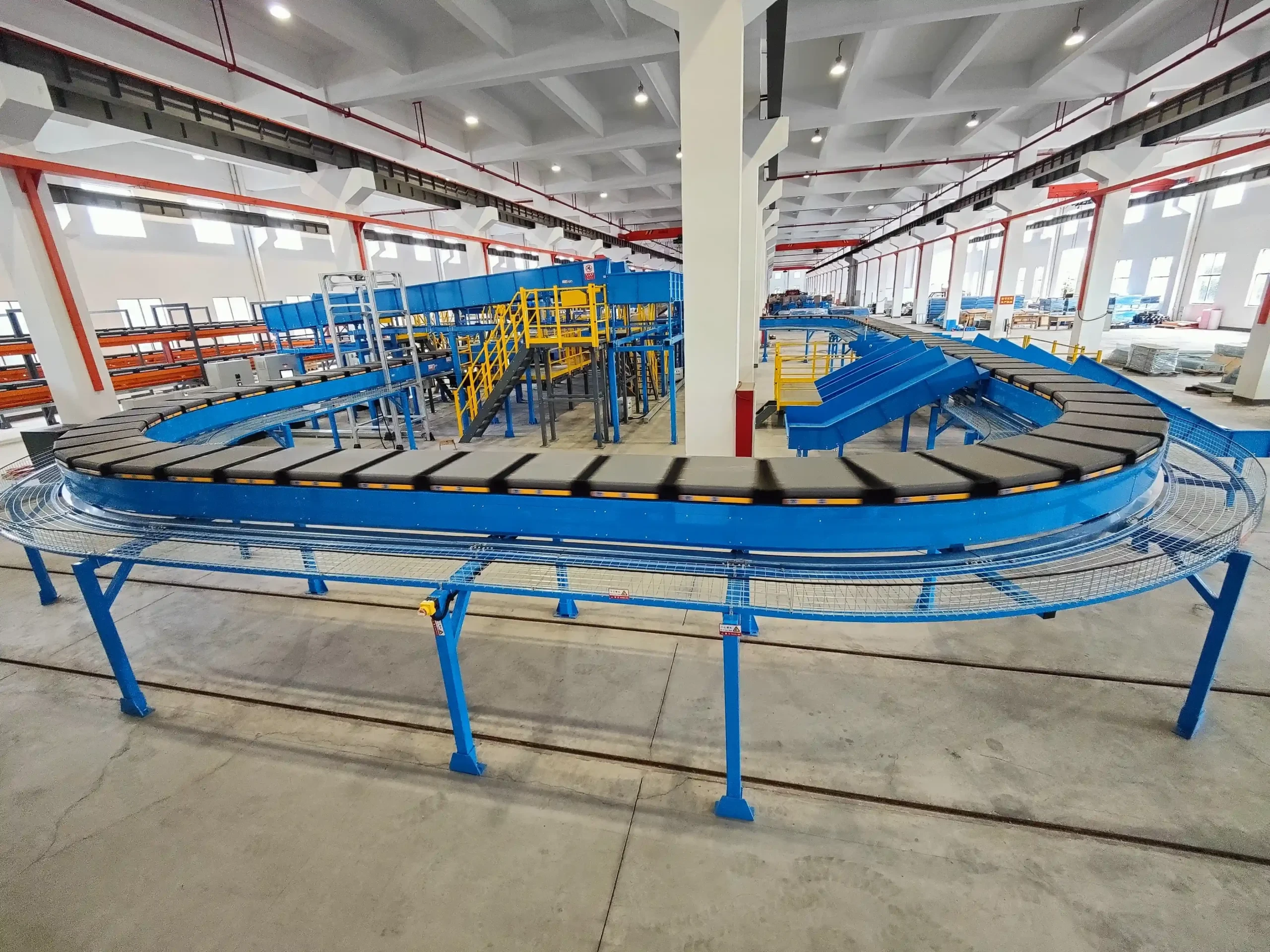
Modern distribution centers depend on speed, precision, and uninterrupted material flow. Among the most important systems supporting high-volume logistics operations is the cross-belt sorter. From e-commerce fulfillment hubs to parcel handling facilities and airport cargo terminals, cross-belt sorting systems have become the backbone of automated distribution.
However, even the most advanced sorting equipment can experience operational failures. A single conveyor jam, sensor malfunction, or belt alignment issue can quickly reduce throughput, create shipment delays, and increase labor costs. For warehouse managers and maintenance teams, the ability to diagnose and resolve issues immediately is essential for maintaining operational continuity.
This guide explores the most common cross-belt sorter failures, their root causes, troubleshooting procedures, and practical instant repair techniques that can help minimize downtime and extend equipment lifespan.

Understanding How a Cross-Belt Sorter Works
Before diving into troubleshooting methods, it is important to understand the core operating principles of a cross-belt sorter.
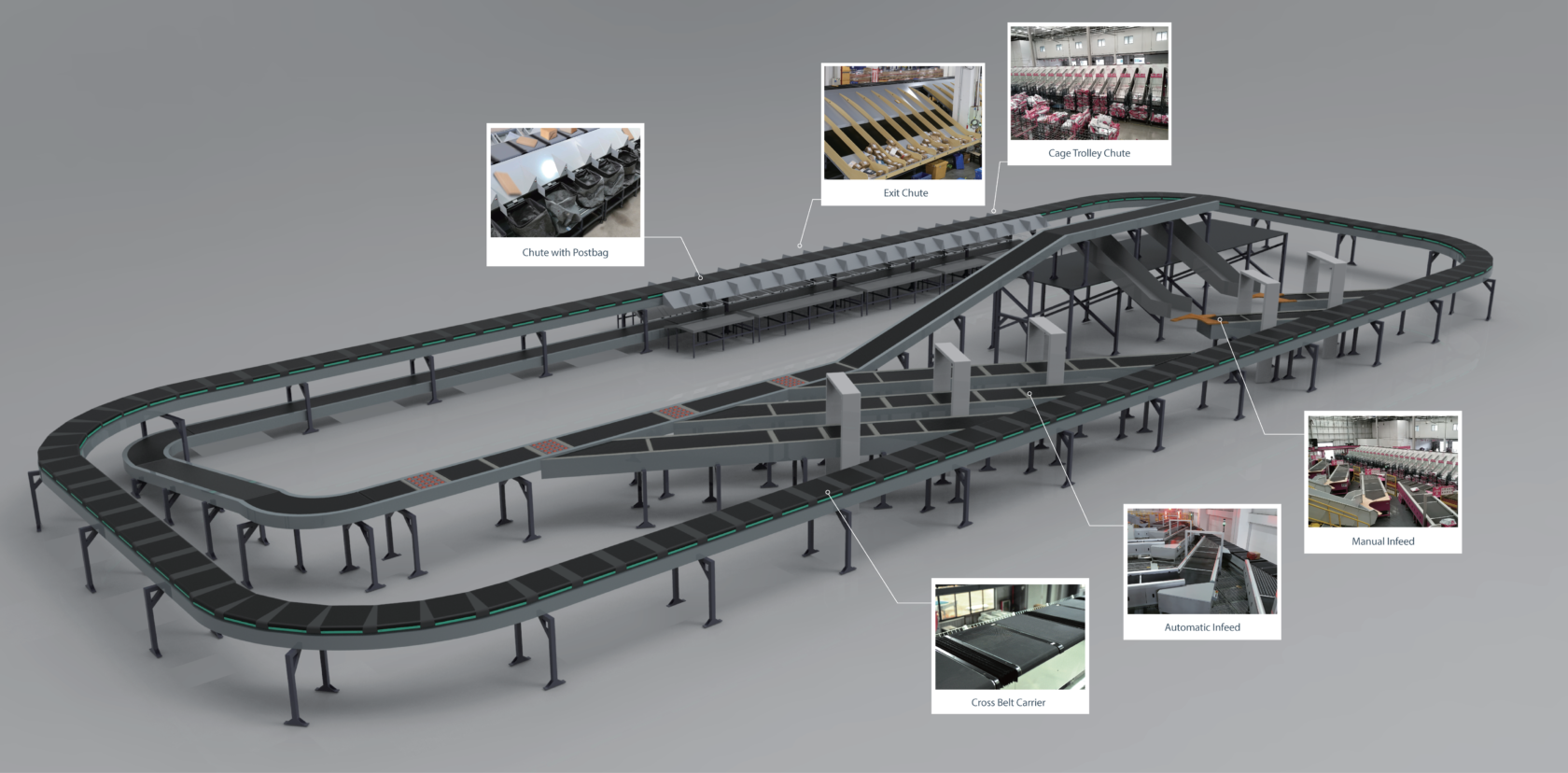
A cross-belt sorting system typically consists of:
- A main loop conveyor
- Individual carrier carts
- Cross-belts mounted on each carrier
- Drive motors
- Sensors and scanners
- PLC control systems
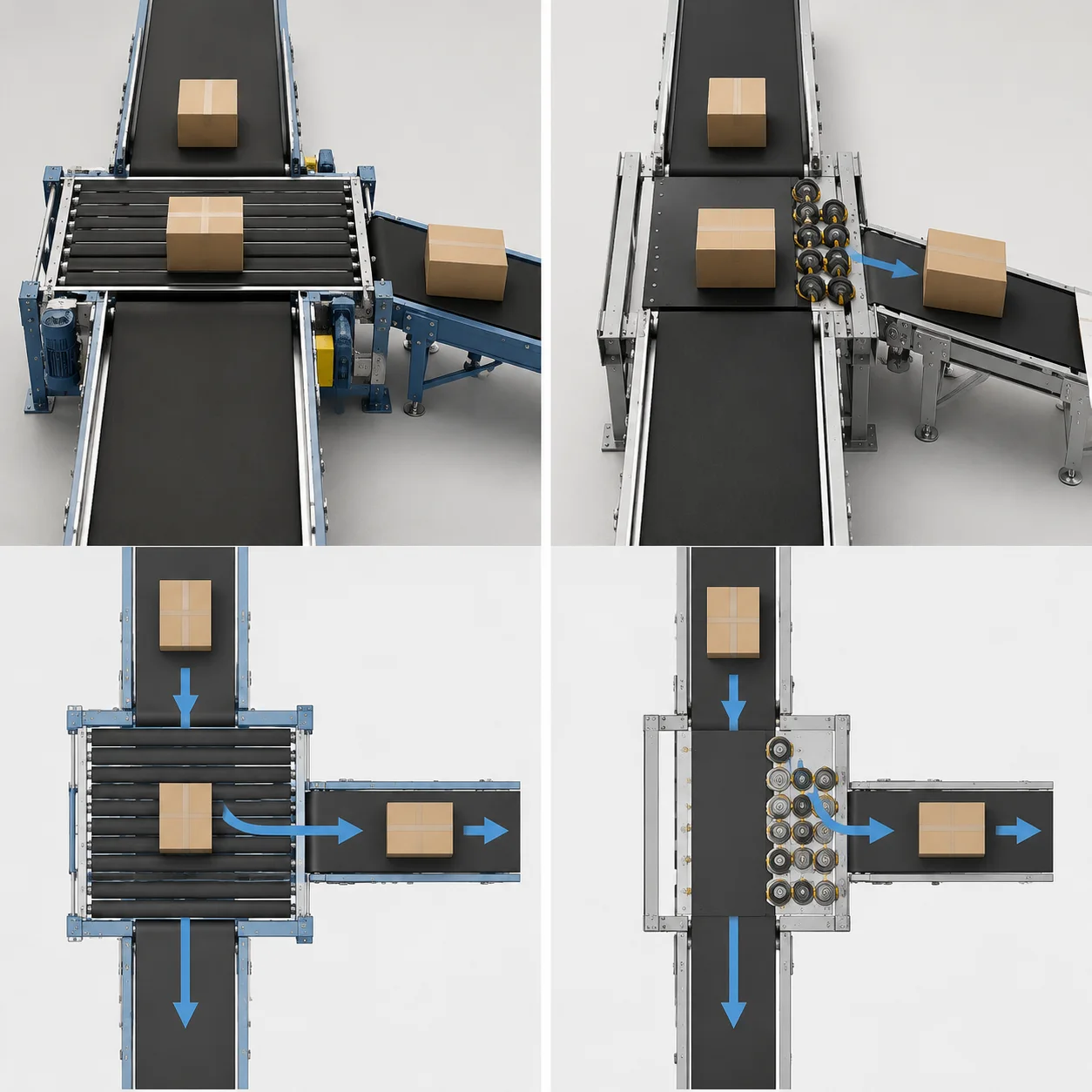
- Diverts and discharge chutes
Products are identified through barcode or RFID scanning and routed to the correct destination through synchronized belt movement. The system relies heavily on precise timing, accurate sensing, and continuous mechanical coordination.
Because multiple components operate simultaneously at high speed, even minor irregularities can trigger larger operational failures.
Why Cross-Belt Sorter Failures Happen
Most cross-belt sorter problems originate from one of four categories:
- Mechanical wear
- Electrical failures
- Sensor and communication issues
- Operational overload or contamination
Facilities operating in high-throughput environments often experience accelerated wear due to:
- Continuous 24/7 operation
- Dust accumulation
- Improper loading practices
- Inadequate preventive maintenance
- Temperature fluctuations
- Excessive vibration
- Poor lubrication schedules
Understanding the source of failures is the first step toward rapid recovery.
Common Cross-Belt Sorter Failures and Their Solutions
1. Belt Misalignment
Symptoms
- Products drifting during transport
- Belt edge wear
- Abnormal friction noise
- Frequent emergency stops
- Uneven belt tracking
Root Causes
Cross-belt misalignment usually occurs because of:
- Roller wear
- Uneven tension
- Damaged pulleys
- Loose mounting hardware
- Structural vibration
Even slight deviations can affect sorting precision.
Troubleshooting Steps
Step 1: Inspect Belt Tracking
Observe whether the belt consistently shifts toward one side during operation.
Step 2: Check Roller Condition
Look for:
- Worn bearings
- Roller contamination
- Uneven surfaces
Step 3: Measure Belt Tension
Use a belt tension gauge to verify proper specifications.
Step 4: Inspect Pulley Alignment
Misaligned pulleys commonly create lateral belt movement.
Instant Repair Techniques
- Adjust tracking rollers gradually
- Tighten loose hardware
- Remove debris from rollers
- Replace damaged bearings immediately
- Re-center the belt during low-speed operation
Prevention Tips
- Conduct weekly tracking inspections
- Maintain consistent belt tension
- Replace worn rollers proactively
2. Cross-Belt Slippage
Symptoms
- Delayed parcel discharge
- Incomplete sorting actions
- Reduced transfer speed
- Burning smell from friction
Common Causes
Belt slippage often develops due to:
- Low tension
- Worn drive pulleys
- Oil contamination
- Excessive load weight
- Motor torque reduction
Diagnostic Process
Inspect Belt Surface
Check for:
- Polishing
- Cracks
- Glazing
- Contamination
Test Motor Output
Verify motor RPM consistency under load conditions.
Evaluate Product Weight
Overweight parcels frequently cause drive instability.
Immediate Repair Methods
- Clean oil or dust contamination
- Increase tension incrementally
- Replace worn friction surfaces
- Reduce temporary load volume
- Recalibrate motor torque settings
Long-Term Maintenance Strategy
Routine cleaning and proper load distribution significantly reduce slippage risk.
3. Carrier Jam Failures
Warning Signs
- Sudden conveyor stoppage
- Carrier collision alarms
- Excessive vibration
- Irregular spacing between carriers
Main Causes
Carrier jams are usually linked to:
- Foreign object intrusion
- Damaged guide rails
- Wheel wear
- Improper parcel dimensions
- Structural deformation
Inspection Procedure
Check Rail Pathways
Look for:
- Debris
- Loose bolts
- Rail bending
Examine Carrier Wheels
Flat spots and bearing failures commonly create movement instability.
Verify Parcel Dimensions
Oversized items may become trapped during transfer.
Emergency Repair Techniques
- Remove obstruction immediately
- Replace damaged wheel assemblies
- Reset carrier spacing through PLC control
- Isolate damaged sections temporarily
- Conduct low-speed restart procedures
Preventive Measures
- Install debris guards
- Improve inbound package screening
- Schedule wheel inspections regularly
4. Sensor Detection Failure
Common Symptoms
- Missed sorting destinations
- Incorrect chute assignment
- Random system stoppages
- Barcode reading failures
Typical Causes
Sensors may fail because of:
- Dust accumulation
- Misalignment
- Wiring damage
- Electrical interference
- Lens contamination
Troubleshooting Process
Clean Sensor Surfaces
Dust is one of the most common causes of optical failure.
Verify Alignment
Use calibration tools to ensure proper positioning.
Check Signal Stability
Inspect wiring for:
- Loose terminals
- Frayed cables
- Voltage fluctuations
Instant Repair Solutions
- Clean lenses using non-abrasive materials
- Re-align sensor brackets
- Replace damaged connectors
- Restart communication modules
- Use backup scanner channels
Best Practices
- Implement daily cleaning schedules
- Shield cables from interference
- Monitor signal strength continuously
5. PLC Communication Errors
Indicators
- Unexpected system shutdowns
- Delayed sorting commands
- Intermittent operational pauses
- HMI warning alarms
Root Causes
PLC communication failures may involve:
- Ethernet instability
- Power fluctuations
- Firmware incompatibility
- Overloaded networks
- Broken communication modules
Troubleshooting Workflow
Review Error Logs
Identify recurring communication codes.
Inspect Network Hardware
Check:
- Switches
- Routers
- Ethernet connectors
Verify Power Supply Stability
Voltage instability can interrupt communication.
Fast Recovery Methods
- Reboot communication modules
- Replace faulty cables
- Restore backup PLC configurations
- Isolate overloaded network segments
- Reset emergency stop circuits
Prevention Strategy
- Use industrial-grade networking equipment
- Maintain firmware updates
- Install UPS protection systems
6. Motor Overheating
Symptoms
- Thermal shutdown alarms
- Reduced conveyor speed
- Burning odor
- Motor housing overheating
Causes
Motor overheating typically results from:
- Excessive load
- Poor ventilation
- Bearing wear
- Voltage imbalance
- Continuous overload conditions
Diagnostic Steps
Measure Motor Temperature
Infrared thermometers provide fast diagnostics.
Inspect Cooling Systems
Verify airflow pathways remain unobstructed.
Check Current Draw
Abnormal amperage often signals mechanical resistance.
Instant Repair Techniques
- Reduce operational load
- Improve ventilation
- Replace failing bearings
- Allow temporary cooldown periods
- Remove dust buildup
Long-Term Solutions
- Implement thermal monitoring systems
- Use predictive maintenance software
- Balance load distribution
7. Abnormal Noise and Vibration
Warning Signs
- Grinding sounds
- Rhythmic knocking
- High-frequency squealing
- Structural shaking
Common Sources
Noise and vibration often indicate:
- Loose hardware
- Bearing deterioration
- Misaligned shafts
- Frame instability
- Chain wear
Inspection Process
Use Vibration Analysis Tools
Identify abnormal movement patterns.
Inspect Bearings
Listen for rough rotational sounds.
Tighten Structural Components
Loose bolts frequently amplify vibration.
Quick Repair Methods
- Tighten fasteners
- Lubricate bearings
- Replace damaged rollers
- Align shafts
- Reduce operating speed temporarily
Prevention Techniques
- Conduct monthly vibration analysis
- Use condition-monitoring systems
- Replace bearings before failure
8. Barcode Scanning Failures
Operational Symptoms
- Increased manual sorting
- Package recirculation
- Read-rate reduction
- Misrouting
Root Causes
Barcode failures can result from:
- Damaged labels
- Poor print quality
- Scanner contamination
- Incorrect positioning
- Lighting interference
Troubleshooting Methods
Inspect Barcode Quality
Look for:
- Smudging
- Low contrast
- Torn labels
Clean Scanner Windows
Dust can drastically reduce accuracy.
Verify Lighting Conditions
Excessive glare may interfere with scanning.
Instant Recovery Actions
- Replace unreadable labels
- Adjust scanner angles
- Increase scanner sensitivity
- Use redundant scanning stations
Preventive Maintenance
- Standardize label quality
- Train operators on label placement
- Perform scanner cleaning daily
9. Conveyor Chain Failures
Symptoms
- Jerking motion
- Chain skipping
- Uneven movement
- Sudden stoppages
Causes
Chain issues often originate from:
- Insufficient lubrication
- Elongation
- Sprocket wear
- Improper tension
Troubleshooting Process
Inspect Chain Wear
Measure elongation against manufacturer standards.
Check Lubrication Levels
Dry chains create excessive friction.
Examine Sprockets
Worn teeth can accelerate chain damage.
Emergency Repair Techniques
- Lubricate immediately
- Adjust chain tension
- Replace damaged links
- Install temporary master links
Long-Term Maintenance
- Use automatic lubrication systems
- Monitor chain elongation routinely
10. Parcel Recirculation Problems
Signs
- Packages repeatedly cycling
- Increased congestion
- Throughput reduction
- Destination assignment errors
Main Causes
Recirculation problems may stem from:
- Scanner failure
- Sorting logic errors
- Jammed chutes
- Timing inaccuracies
Diagnostic Procedure
Review Sorting Software Logs
Check routing logic consistency.
Inspect Diverts
Ensure mechanical movement remains smooth.
Analyze Timing Synchronization
Incorrect timing frequently creates missed diverts.
Rapid Repair Actions
- Reset divert actuators
- Clear chute blockages
- Restart affected software modules
- Adjust synchronization parameters
Prevention Methods
- Conduct regular software diagnostics
- Maintain chute cleanliness
- Test divert timing frequently
Essential Emergency Troubleshooting Workflow
When a cross-belt sorter suddenly stops, maintenance teams should follow a structured response process.
Step 1: Identify Alarm Codes
Never begin random disassembly before reviewing:
- PLC alerts
- HMI warnings
- Sensor indicators
Step 2: Isolate the Failure Area
Determine whether the issue is:
- Mechanical
- Electrical
- Software-related
- Pneumatic
Step 3: Switch to Safe Mode
Reduce conveyor speed before intervention.
Step 4: Inspect High-Risk Components
Focus on:
- Sensors
- Belts
- Motors
- Carrier wheels
- Communication cables
Step 5: Perform Controlled Restart
Never restart the system at full production speed immediately after repairs.
Preventive Maintenance Strategies for Cross-Belt Sorters
Reactive maintenance alone is not enough in modern automated logistics environments.
A strong preventive maintenance strategy should include:
Daily Tasks
- Remove debris
- Clean sensors
- Check belt tracking
- Monitor abnormal sounds
Weekly Tasks
- Inspect rollers
- Verify chain lubrication
- Test emergency stop circuits
Monthly Tasks
- Conduct vibration analysis
- Inspect electrical connections
- Review software logs
Quarterly Tasks
- Replace worn bearings
- Perform PLC diagnostics
- Recalibrate sensors
Predictive Maintenance and Smart Monitoring
Advanced facilities increasingly rely on predictive maintenance technologies to reduce unplanned downtime.
These systems may include:
- IoT sensors
- Thermal imaging
- AI-based diagnostics
- Vibration monitoring
- Cloud-based maintenance analytics
Predictive monitoring allows maintenance teams to identify small abnormalities before they become critical failures.
Benefits include:
- Reduced downtime
- Lower repair costs
- Extended equipment lifespan
- Improved sorting accuracy
- Better operational efficiency
Safety Considerations During Emergency Repairs
Cross-belt sorters contain moving mechanical components that can create serious hazards during repair procedures.
Maintenance teams should always:
- Lock out and tag out power sources
- Wear protective equipment
- Use insulated tools
- Follow manufacturer safety protocols
- Verify zero-energy states before servicing
Safety violations during rushed repairs often create larger operational and legal risks.
Training Operators to Reduce Equipment Failure
Human error remains one of the leading causes of sorting system disruptions.
Proper operator training should cover:
- Parcel dimension limits
- Emergency stop procedures
- Early warning signs
- Basic troubleshooting
- Safe loading practices
Well-trained operators can often detect abnormalities before severe failures occur.
Spare Parts Every Facility Should Stock
Maintaining critical spare parts can dramatically reduce downtime.
Recommended inventory includes:
- Bearings
- Drive belts
- Sensors
- Carrier wheels
- Motor controllers
- PLC communication modules
- Emergency stop switches
- Barcode scanners
Facilities without spare part readiness often experience prolonged production interruptions.
Choosing the Right Maintenance Strategy
Different facilities require different maintenance approaches depending on throughput volume, operating hours, and automation complexity.
Reactive Maintenance
Best for:
- Low-volume facilities
- Non-critical operations
Preventive Maintenance
Best for:
- Medium to high-volume warehouses
- E-commerce fulfillment centers
Predictive Maintenance
Best for:
- Large-scale automated logistics hubs
- 24/7 operations
- High-speed parcel networks
The most effective operations usually combine all three approaches strategically.
Final Thoughts
Cross-belt sorters play a critical role in modern logistics automation, but even highly advanced systems are vulnerable to wear, contamination, alignment issues, and electronic failures. Rapid troubleshooting and immediate repair capabilities are essential for minimizing operational disruption and protecting throughput performance.
From belt slippage and carrier jams to sensor failures and PLC communication issues, understanding the root causes behind common failures allows maintenance teams to respond quickly and effectively.
Facilities that invest in preventive maintenance, predictive monitoring, operator training, and spare parts readiness can significantly reduce downtime while improving the overall reliability of their sorting systems.
In today’s fast-moving fulfillment environment, operational continuity depends not only on automation technology itself, but also on the speed and precision of the teams responsible for maintaining it.